Desk Launcher: Difference between revisions
Jump to navigation
Jump to search
No edit summary |
No edit summary |
||
| (5 intermediate revisions by 2 users not shown) | |||
| Line 1: | Line 1: | ||
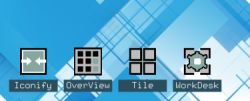
[[File:desk-launcher-4x.png|right|250px|link=Desk Launcher|Image]] '''[[Desk Launcher]]''' <small>''( | [[File:desk-launcher-4x.png|right|250px|link=Desk Launcher|Image]] '''[[Desk Launcher]]''' <small>''(functions)''</small> is an application launcher. Normally, an icon represents a minimized application. If you want to turn that around, launch functions or modules by clicking on icons. Here’s how to do that using FvwmButtons. | ||
<pre> | <pre> | ||
## FILE 1 | ## FILE 1: deskL.txt | ||
## Functions | ## Functions | ||
SetEnv dLicons /icons | SetEnv dLicons $[HOME]/.fvwm/icons | ||
## Iconify all except focused window. | ## Iconify all except focused window. | ||
| Line 54: | Line 54: | ||
'''HOW TO''': | '''HOW TO''': | ||
Copy the code and paste it into your config. Or create FILE 1 and run the below line:<br> | Copy the code and paste it into your config. Or create FILE 1 and run the below line:<br> | ||
''Read | ''Read $[HOME]/.fvwm/deskL.txt''<br> | ||
---- | ---- | ||
Read more:<br /> | Read more:<br /> | ||
| Line 67: | Line 64: | ||
[[Category:functions]] | [[Category:functions]] | ||
[[Category:action]] | [[Category:action]] | ||
[[Category:codes]] | |||
Latest revision as of 11:45, 12 July 2025
Desk Launcher (functions) is an application launcher. Normally, an icon represents a minimized application. If you want to turn that around, launch functions or modules by clicking on icons. Here’s how to do that using FvwmButtons.
## FILE 1: deskL.txt
## Functions

SetEnv dLicons $[HOME]/.fvwm/icons

## Iconify all except focused window.
DestroyFunc AIconic
AddToFunc AIconic
+ I All (CurrentPage, !Iconic, !Focused) Thumbnail

## OverView (using function FvwmExpose)

## Vertical/horizontal tiling
DestroyFunc WTile
AddToFunc WTile
+ I Read deTile.txt

## Work Desk environment
DestroyFunc WorkD
AddToFunc WorkD
+ I Read workDesktxt

## Exclude FvwmButtons being iconified.
Style FvwmButtons !Iconifiable

DestroyFunc DLauncher
AddToFunc DLauncher
+ I DestroyModuleConfig $0DLaunch: *
+ I *$0DLaunch: Geometry 80x80
+ I *$0DLaunch: PressColorset 7
+ I *$0DLaunch: Columns 1
+ I *$0DLaunch: Rows    4
+ I *$0DLaunch: Frame   0
+ I *$0DLaunch: (1x3+0+0, Icon $1, Action (Mouse 1) `$2`)
+ I *$0DLaunch: Pixmap none
+ I *$0DLaunch: (1x1+0+3, Font 9x15, Fore White, Back #2b4e5e, \
                Title $0, Action (Mouse 1) `Exec exec $2`)
+ I Style $0DLaunch HandleWidth 0, NoTitle
+ I Module FvwmButtons $3 $0DLaunch
+ I UpdateStyles

DLauncher Iconify $[dLicons]/iconifyBkg.png "AIconic" "-g +15-15"
DLauncher OverView $[dLicons]/overViewBkg.png 'FvwmExpose' "-g +105-15"
DLauncher Tile $[dLicons]/tileBkg.png "WTile" "-g +195-15"
DLauncher WorkDesk $[dLicons]/work.png "WorkD" "-g +285-15"

Style *DLaunch* !Borders, !Title, WindowListSkip, Sticky, StaysOnTop
Style *DLaunch* NeverFocus
HOW TO:
Copy the code and paste it into your config. Or create FILE 1 and run the below line:
Read $[HOME]/.fvwm/deskL.txt
Read more:
https://www.fvwm.org/Wiki/Tips/IconsOnDesktop
https://www.fvwm.org/Wiki/CookBook/IconifyExcept