Dash To Dock: Difference between revisions
Jump to navigation
Jump to search
No edit summary |
No edit summary |
||
| (6 intermediate revisions by the same user not shown) | |||
| Line 1: | Line 1: | ||
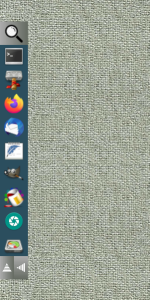
[[File:dashTo-dock.png|right|150px|link=Dash To Dock|Image]] '''[[Dash To Dock]]''' <small>''(modules)''</small> is an application panel bar that can be moved to different | [[File:dashTo-dock.png|right|150px|link=Dash To Dock|Image]] '''[[Dash To Dock]]''' <small>''(modules)''</small> is an application panel bar that can be moved to a different side of the screen to be pushed temporarily aside when working at a crowded desk. | ||
<pre> | <pre> | ||
| Line 7: | Line 7: | ||
SetEnv dir-icon $[HOME]/.fvwm/icons | SetEnv dir-icon $[HOME]/.fvwm/icons | ||
SetEnv dTDicons $[HOME]/.fvwm/icons/icon40x40 | SetEnv dTDicons $[HOME]/.fvwm/icons/icon40x40 | ||
## Colorsets | ## Colorsets | ||
| Line 14: | Line 13: | ||
Colorset 23 fg black, bg #9c9c9c, hi #24424f, sh #111f26, Plain, NoShape | Colorset 23 fg black, bg #9c9c9c, hi #24424f, sh #111f26, Plain, NoShape | ||
## | ## Move the app panel upward horizontally. | ||
DestroyFunc dNorth | DestroyFunc dNorth | ||
| Line 25: | Line 23: | ||
+ I dTDock | + I dTDock | ||
+ I Module FvwmButtons DashToDock | + I Module FvwmButtons DashToDock | ||
## Move the app panel vertically to the left. | |||
DestroyFunc dWest | DestroyFunc dWest | ||
| Line 36: | Line 36: | ||
## Dockbar | ## Dockbar | ||
DestroyFunc dTDock | DestroyFunc dTDock | ||
| Line 43: | Line 42: | ||
+ I *DashToDock: Frame 0 | + I *DashToDock: Frame 0 | ||
## Apps | ## Apps | ||
+ I *DashToDock: (1x1, | + I *DashToDock: (1x1, Colorset 21, Icon $[dir-icon]/search44x44.png, Action(Mouse 1) "Exec exec xfce4-appfinder" ) | ||
+ I *DashToDock: (1x1, Colorset 10, Icon $[dTDicons]/terminal.png \ | + I *DashToDock: (1x1, Colorset 10, Icon $[dTDicons]/terminal.png \ | ||
Action(Mouse 1) "Exec exec xfce4-terminal") | Action(Mouse 1) "Exec exec xfce4-terminal") | ||
| Line 64: | Line 63: | ||
## Container | ## Container | ||
+ I *DashToDock: (Container(Rows 1,Frame 0)) | + I *DashToDock: (Container(Rows 1,Frame 0)) | ||
+ I *DashToDock: (Colorset | + I *DashToDock: (Colorset 22, Icon $[dir-icon]/up.png, Action(Mouse 1) dNorth) | ||
+ I *DashToDock: (Colorset | + I *DashToDock: (Colorset 21, Icon $[dir-icon]/left.png, Action(Mouse 1) dWest) | ||
## Default startup | ## Default startup | ||
| Line 76: | Line 75: | ||
'''HOW TO''': | '''HOW TO''': | ||
Copy the code and paste it into your config. Or create FILE 1 and run the below line:<br> | Copy the code and paste it into your config. Or create FILE 1 and run the below line:<br> | ||
''Read $[HOME].fvwm/dashToD.txt'' | ''Read $[HOME]/.fvwm/dashToD.txt'' | ||
---- | ---- | ||
Download icons:<br> | Download icons:<br> | ||
Latest revision as of 07:00, 13 July 2025
Dash To Dock (modules) is an application panel bar that can be moved to a different side of the screen to be pushed temporarily aside when working at a crowded desk.
## FILE 1: dashToD.txt
## Modules

SetEnv dir-icon $[HOME]/.fvwm/icons
SetEnv dTDicons $[HOME]/.fvwm/icons/icon40x40

## Colorsets
Colorset 21 HGradient 20 #ababab #666c63
Colorset 22 VGradient 20 #ababab #666c63
Colorset 23 fg black, bg #9c9c9c, hi #24424f, sh #111f26, Plain, NoShape

## Move the app panel upward horizontally.

DestroyFunc dNorth
AddToFunc dNorth
+ I KillModule FvwmButtons DashToDock
+ I DestroyModuleConfig DashToDock: *
+ I *DashToDock: Geometry 517x56-550+2	#(horizontal [hight]x[width]+[rightleft]+[top-down])
+ I *DashToDock: Columns 11  #(1 container + 10 as per numbers of buttons in dashToD.txt)
+ I dTDock
+ I Module FvwmButtons DashToDock

## Move the app panel vertically to the left.

DestroyFunc dWest
AddToFunc dWest
+ I KillModule FvwmButtons DashToDock
+ I DestroyModuleConfig DashToDock: *
+ I *DashToDock: Geometry 56x517+2+192 #(vertical west [width]x[hight]+[left-right]+[top-down])
+ I *DashToDock: Rows 11  #(1 container + 10 as per numbers of buttons in dashToD.txt)
+ I dTDock
+ I Module FvwmButtons DashToDock

## Dockbar

DestroyFunc dTDock
AddToFunc dTDock
+ I *DashToDock: PressColorset 23
+ I *DashToDock: Frame 0
## Apps
+ I *DashToDock: (1x1, Colorset 21, Icon $[dir-icon]/search44x44.png, Action(Mouse 1) "Exec exec xfce4-appfinder" )
+ I *DashToDock: (1x1, Colorset 10, Icon $[dTDicons]/terminal.png \
			  Action(Mouse 1) "Exec exec xfce4-terminal")
+ I *DashToDock: (1x1, Colorset 10, Icon $[dTDicons]/thunar.png, \
              Action(Mouse 1) "Exec exec thunar")
+ I *DashToDock: (1x1, Colorset 10, Icon $[dTDicons]/firefox.png, \
              Action(Mouse 1) "Exec exec firefox")
+ I *DashToDock: (1x1,Colorset 10, Icon $[dTDicons]/thunderbird.png, \
              Action(Mouse 1) "Exec exec thunderbird")
+ I *DashToDock: (1x1, Colorset 10, Icon $[dTDicons]/featherpad.png, \
              Action(Mouse 1) "Exec exec featherpad")
+ I *DashToDock: (1x1, Colorset 10, Icon $[dTDicons]/gimp.png, \
              Action(Mouse 1) "Exec exec gimp")
+ I *DashToDock: (1x1, Colorset 10, Icon $[dTDicons]/desktop-color.png, \
              Action(Mouse 1) "Exec exec lxappearance")
+ I *DashToDock: (1x1, Colorset 10, Icon $[dTDicons]/screenshooter.png, \
              Action(Mouse 1) "Exec exec xfce4-screenshooter")
+ I *DashToDock: (1x1, Colorset 10, Icon $[dTDicons]/gparted.png, \
              Action(Mouse 1) "Exec exec /usr/sbin/gparted ")
## Container
+ I *DashToDock: (Container(Rows 1,Frame 0))
+ I *DashToDock: (Colorset 22, Icon $[dir-icon]/up.png, Action(Mouse 1) dNorth)
+ I *DashToDock: (Colorset 21, Icon $[dir-icon]/left.png, Action(Mouse 1) dWest)

## Default startup
dWest

## Style setting
Style DashToDock !Borders, !Title, WindowListSkip, StaysOnTop, Sticky
HOW TO:
Copy the code and paste it into your config. Or create FILE 1 and run the below line:
Read $[HOME]/.fvwm/dashToD.txt
Download icons:
https://rasatpc.net/download/icons/dTD-icons.zip