Thin Decor: Difference between revisions
Jump to navigation
Jump to search
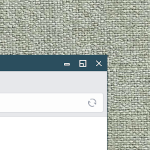
(Created page with "right|150px|link=Thin Decor|Image '''Thin Decor''' <small>''(decor)''</small> A thin and stylish configuration for the looks of the windows. <pre> ## FILE 1 ## Decor: thinDec.txt ## Title active color Colorset 40 fg #ffffff, bg #2b4e5e, hi #2b4e5e, sh #2b4e5e, Plain, NoShape ## Title inactive color Colorset 41 fg #000000, bg #028383, hi, sh, Plain, NoShape ## DECORATIONS ## Reset all buttons. ButtonStyle Reset #### Window Buttons: [1 3 5...") |
No edit summary |
||
| Line 49: | Line 49: | ||
'''HOW TO''': | '''HOW TO''': | ||
Copy the code and paste it into your config. Or create FILE 1 and run the below line:<br> | Copy the code and paste it into your config. Or create FILE 1 and run the below line:<br> | ||
''Read thindec.txt''<br> | ''Read $[HOME]/thindec.txt''<br> | ||
[[Category:decor]] | [[Category:decor]] | ||
[[Category:codes]] | [[Category:codes]] | ||

Revision as of 18:25, 11 July 2025
Thin Decor (decor) A thin and stylish configuration for the looks of the windows.
## FILE 1
## Decor: thinDec.txt

## Title active color
Colorset 40 fg #ffffff, bg #2b4e5e, hi #2b4e5e, sh #2b4e5e, Plain, NoShape

## Title inactive color
Colorset 41 fg #000000, bg #028383, hi, sh, Plain, NoShape

## DECORATIONS

## Reset all buttons.
ButtonStyle Reset

#### Window Buttons: [1 3 5 7 9  TTTTT  0 8 6 4 2]
# 1 - Open the WindowOps menu.
# 2 - Close on single click, Destroy on double click.
# 4 - Maximize (right/middle button will only maximize vertical/horizontal)
# 6 - Iconify (minimize)
####

Mouse 1 2 A Close

# Titel bar (active "- x" and inactive "...")

TitleStyle Centered Height 23 -- Flat
ButtonStyle All Inactive Vector 5 47x47@3 57x53@3 53x53@3 53x47@3 47x47@3 -- Flat
AddButtonStyle 1 Active Vector 5 45x45@3 55x45@3 55x55@3 45x55@3 45x45@3 # Menu
AddButtonStyle 2 Active Vector 4 35x35@3 65x65@3 65x35@4 35x65@3 # Close
AddButtonStyle 4 Active Vector 8 30x70@3 30x30@3 70x30@3 70x70@3 30x70@3 \
                 30x50@4 50x50@3 50x70@3
AddButtonStyle 6 Active Vector 5 35x60@3 65x60@3 65x50@3 35x50@3 35x60@3 # Iconify

## Decoration Styles

TitleStyle Centered Height 26 -- Flat
Style * Colorset 1, HilightColorset 40 # inactive and active title bar
Style * BorderColorset 1, HilightBorderColorset 4

## Special Rules

Style * !Handles, BorderWidth 1, HandleWidth 0
HOW TO:
Copy the code and paste it into your config. Or create FILE 1 and run the below line:
Read $[HOME]/thindec.txt