Menu Blue: Difference between revisions
Jump to navigation
Jump to search
(Created page with "right|150px|link=Menu Blue|Image '''Menu Blue''' <small>''(styles)''</small> is similar to Styles, so all the menus look the same, such as this Blue Menu. <pre> ## FILE 1 ## Styles: mBlue.conf ## Color and shape for menus. ## MENUS ## Menu Styling MenuStyle * MenuColorset 0, ActiveColorset 1, GreyedColorset 7, TitleColorset 10 MenuStyle * Hilight3DOff, HilightBack, HilightTitleBack, SeparatorsLong MenuStyle * TrianglesSolid, TrianglesUseFore...") |
No edit summary |
||
| Line 18: | Line 18: | ||
.... | .... | ||
'''HOW TO''': | '''HOW TO''': | ||
Copy the code and paste it into your config. Or create FILE 1 and run the below line:<br> | |||
''Read mBlue.txt'<br> | |||
''Read | |||
__NOTOC____NOEDITSECTION__ | __NOTOC____NOEDITSECTION__ | ||

Revision as of 15:22, 10 July 2025
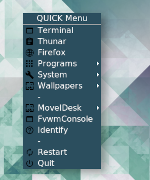
Menu Blue (styles) is similar to Styles, so all the menus look the same, such as this Blue Menu.
## FILE 1
## Styles: mBlue.conf
## Color and shape for menus.

## MENUS
## Menu Styling

MenuStyle * MenuColorset 0, ActiveColorset 1, GreyedColorset 7, TitleColorset 10
MenuStyle * Hilight3DOff, HilightBack, HilightTitleBack, SeparatorsLong
MenuStyle * TrianglesSolid, TrianglesUseFore
MenuStyle * Font "xft:Noto:Sans:size=12"
MenuStyle * ItemFormat "%|%4.2i%5.3l%5.3>%|"
MenuStyle * BorderWidth 0
....
HOW TO:
Copy the code and paste it into your config. Or create FILE 1 and run the below line:
Read mBlue.txt'