Pager 2x4: Difference between revisions
Jump to navigation
Jump to search
No edit summary |
No edit summary |
||
| Line 3: | Line 3: | ||
<pre> | <pre> | ||
## FILE 1: vPager4.txt | ## FILE 1: vPager4.txt | ||
## Modules | |||
######## | ######## | ||
| Line 44: | Line 45: | ||
'''HOW TO''': | '''HOW TO''': | ||
Copy the code and paste it into your config. Or create FILE 1 and run the below line:<br> | Copy the code and paste it into your config. Or create FILE 1 and run the below line:<br> | ||
''Read vPager4.txt'' | ''Read $[HOME]/.fvwm/vPager4.txt'' | ||
__NOTOC____NOEDITSECTION__ | __NOTOC____NOEDITSECTION__ | ||
Latest revision as of 12:07, 12 July 2025
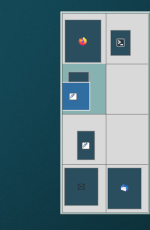
Pager 2x4 (modules) is a miniature view of the desktops(2x4). The pager is used to change your view-port into the current desktop, to change desktops, or to move windows around.
## FILE 1: vPager4.txt
## Modules

########
# Vertical Pager (4 pages)
########

# Virtual Desktop
DesktopSize "2x4"

Module FvwmPager V2x4Pager

DestroyModuleConfig V2x4Pager: *
*V2x4Pager: Geometry 172x400-0+190
*V2x4Pager: Back #d9d9d9
*V2x4Pager: HilightColorset * 6 #selected page background (original 13)
*V2x4Pager: BalloonColorset * 10 # font color
*V2x4Pager: WindowColorsets 10 27 # (inactive and active apps)
*V2x4Pager: Font none
*V2x4Pager: SolidSeparators
*V2x4Pager: WindowBorderWidth 1
*V2x4Pager: BalloonStringFormat %c
*V2x4Pager: BallonYOffset +2
*V2x4Pager: Window3dBorders
*V2x4Pager: UseSkipList # hides modules
*V2x4Pager: MiniIcons

Style "V2x4Pager" NoTitle, !Handles, Borders, StaysOnTop, BorderWidth 5, BorderColorset 6, Sticky, WindowListSkip, FixedSize, !Iconifiable ## BorderColorset 19 (border line)

Module V2x4Pager

## Change preloaded settings

## Titlebar Right Click >> Send To
DestroyMenu MenuSendTo
AddToMenu MenuSendTo
+ " Page L 1" MoveToPage 0 0
+ " Page L 2" MoveToPage 0 1
+ " Page R 1" MoveToPage 1 0
+ " Page R 2" MoveToPage 1 1
HOW TO:
Copy the code and paste it into your config. Or create FILE 1 and run the below line:
Read $[HOME]/.fvwm/vPager4.txt