Expose List
Jump to navigation
Jump to search
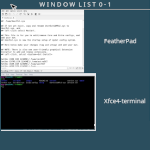
Expose List (functions) use the tools from ImageMagick to take screenshots of an open window and then use it for an icon. Inspired by Taviso’s WindowList function – FvwmExpose:
## FILE 1
## Bindings: fvwmExposeList.txt

## Inspired by Taviso’s WindowList function – FvwmExpose
## https://zensites.net/fvwm/guide/advanced_functions.html

## Set cache location

SetEnv cacheExp $[HOME]/cache

## Thumbnail Panel

DestroyFunc FvwmExpose

AddToFunc FvwmExpose
+ I Current InfoStoreAdd CURRENTWINDOW $[w.id]
+ I AddToMenu FvwmExposeMenu " W I N D O W  L I S T  Desk $[desk.n] | Page $[page.nx] - $[page.ny]"  Title
+ I + DynamicPopDownAction DestroyMenu FvwmExposeMenu
+ I All (!Fvwm*, !Bru*, !Tool*, !Xfce4-panel*, CurrentPage, !Shaded, AcceptsFocus)\
    PipeRead "echo Raise; \
        xwd -silent -id $[w.id] | convert -scale $$(($[w.width]/4)) -quality 0 xwd:- \
        png:$[cacheExp]/icon.exp.$[w.id].png \
    && echo AddToMenu FvwmExposeMenu \
    %$[cacheExp]/icon.exp.$[w.id].png%\\\'\"   $[w.class]  \"\\\' WindowID $[w.id] WarpToWindow 50 50 \
        && echo AddToMenu FvwmExposeMenu \\\"\\\" Nop \
    || Nop"
+ I WindowId $[infostore.CURRENTWINDOW] WarpToWindow 400p 50p
+ I Popup FvwmExposeMenu Colorset 6
+ I Exec exec rm -f $[cacheExp]/icon.exp.*

## Key Binding

Mouse 2 R A FvwmExpose # Mouse middle-click anywhere on the desk.
Mouse 1 I A Iconify off # One click deiconify.
HOW TO: Create folder .fvwm/core/5Bindings/ExposeList and .fvwm/core/5Bindings/ExposeList
Copy the code and paste it into your config. Or create FILE 1 and run the below line:
Read fvwmExposeList.txt