Dash To Dock
Jump to navigation
Jump to search
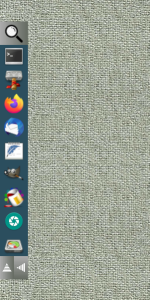
Dash To Dock (modules) is an application panel bar that can be moved to different sides of the screen to be pushed temporarily aside when working on a crowded desk.
## FILE 1: dashToD.txt
## Modules

SetEnv dir-icon $[HOME]/.fvwm/icons
SetEnv dTDicons $[HOME]/.fvwm/icons/icon40x40
SetEnv search-icon $[HOME]/.fvwm/icons/search44x44.png

## Colorsets
Colorset 21 HGradient 20 #ababab #666c63
Colorset 22 VGradient 20 #ababab #666c63
Colorset 23 fg black, bg #9c9c9c, hi #24424f, sh #111f26, Plain, NoShape

## Colorset and icon for apps-finder.
SetEnv colorCode "Colorset 21"

DestroyFunc dNorth
AddToFunc dNorth
+ I KillModule FvwmButtons DashToDock
+ I DestroyModuleConfig DashToDock: *
+ I *DashToDock: Geometry 517x56-550+2	#(horizontal [hight]x[width]+[rightleft]+[top-down])
+ I *DashToDock: Columns 11  #(1 container + 10 as per numbers of buttons in dashToD.txt)
+ I dTDock
+ I Module FvwmButtons DashToDock

DestroyFunc dWest
AddToFunc dWest
+ I KillModule FvwmButtons DashToDock
+ I DestroyModuleConfig DashToDock: *
+ I *DashToDock: Geometry 56x517+2+192 #(vertical west [width]x[hight]+[left-right]+[top-down])
+ I *DashToDock: Rows 11  #(1 container + 10 as per numbers of buttons in dashToD.txt)
+ I dTDock
+ I Module FvwmButtons DashToDock

## Dockbar
#Module FvwmButtons DashToDock

DestroyFunc dTDock
AddToFunc dTDock
+ I *DashToDock: PressColorset 23
+ I *DashToDock: Frame 0
## Apps
+ I *DashToDock: (1x1, $[colorCode], Icon $[search-icon], Action(Mouse 1) "Exec exec xfce4-appfinder" )
+ I *DashToDock: (1x1, Colorset 10, Icon $[dTDicons]/terminal.png \
			  Action(Mouse 1) "Exec exec xfce4-terminal")
+ I *DashToDock: (1x1, Colorset 10, Icon $[dTDicons]/thunar.png, \
              Action(Mouse 1) "Exec exec thunar")
+ I *DashToDock: (1x1, Colorset 10, Icon $[dTDicons]/firefox.png, \
              Action(Mouse 1) "Exec exec firefox")
+ I *DashToDock: (1x1,Colorset 10, Icon $[dTDicons]/thunderbird.png, \
              Action(Mouse 1) "Exec exec thunderbird")
+ I *DashToDock: (1x1, Colorset 10, Icon $[dTDicons]/featherpad.png, \
              Action(Mouse 1) "Exec exec featherpad")
+ I *DashToDock: (1x1, Colorset 10, Icon $[dTDicons]/gimp.png, \
              Action(Mouse 1) "Exec exec gimp")
+ I *DashToDock: (1x1, Colorset 10, Icon $[dTDicons]/desktop-color.png, \
              Action(Mouse 1) "Exec exec lxappearance")
+ I *DashToDock: (1x1, Colorset 10, Icon $[dTDicons]/screenshooter.png, \
              Action(Mouse 1) "Exec exec xfce4-screenshooter")
+ I *DashToDock: (1x1, Colorset 10, Icon $[dTDicons]/gparted.png, \
              Action(Mouse 1) "Exec exec /usr/sbin/gparted ")
## Container
+ I *DashToDock: (Container(Rows 1,Frame 0))
+ I *DashToDock: (Colorset 21, Icon $[dir-icon]/up.png, Action(Mouse 1) dNorth)
+ I *DashToDock: (Colorset 22, Icon $[dir-icon]/left.png, Action(Mouse 1) dWest)

## Default startup
dWest

## Style setting
Style DashToDock !Borders, !Title, WindowListSkip, StaysOnTop, Sticky
HOW TO:
Copy the code and paste it into your config. Or create FILE 1 and run the below line:
Read $[HOME].fvwm/dashToD.txt
Download icons:
https://rasatpc.net/download/icons/dTD-icons.zip