Menu Blue
Jump to navigation
Jump to search

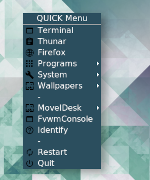
Menu Blue (styles) is similar to Styles, so all the menus look the same, such as this Blue Menu.
## FILE 1
## Styles: mBlue.conf
## Color and shape for menus.

## MENUS
## Menu Styling

MenuStyle * MenuColorset 0, ActiveColorset 1, GreyedColorset 7, TitleColorset 10
MenuStyle * Hilight3DOff, HilightBack, HilightTitleBack, SeparatorsLong
MenuStyle * TrianglesSolid, TrianglesUseFore
MenuStyle * Font "xft:Noto:Sans:size=12"
MenuStyle * ItemFormat "%|%4.2i%5.3l%5.3>%|"
MenuStyle * BorderWidth 0
....
HOW TO:
Create folder .fvwm/core/2Styles/MenuBlue
Copy FILE 1 and run the below line:
Read $[CORE_DIR]/2Styles/MenuBlue/mBlue.conf'