Menu with Xdg
Jump to navigation
Jump to search
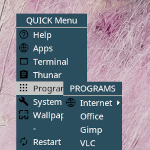
Menu with Xdg (menus) pops up a list of programs and even dynamically to show the contents of applications (Xdg), system files, and wallpapers.
## FILE 1: xdgMenu.txt
## Menus

## Set The Image and Icon Folder
SetEnv mimg $[HOME]/.fvwm/images
SetEnv micon $[HOME]/.fvwm/icons

## Title active color
Colorset 26 fg #ffffff, bg #2b4e5e, hi #2b4e5e, sh #2b4e5e, Plain, NoShape
## Title inactive color (bg) and text (fg)
Colorset 31 fg #000000, bg #c5c5c5, hi, sh, Plain, NoShape

## Menu Styling
MenuStyle * MenuColorset 26, ActiveColorset 31, GreyedColorset 7, TitleColorset 10
MenuStyle * Hilight3DOff, HilightBack, HilightTitleBack, SeparatorsLong
MenuStyle * TrianglesSolid, TrianglesUseFore
MenuStyle * ItemFormat "%|%4.2i%5.3l%5.3>%|"
MenuStyle * BorderWidth 0


########
## MENUS
########

## Root Menu

DestroyMenu MenuFvwmRoot
AddToMenu   MenuFvwmRoot "QUICK Menu" Title
Test (x xfce4-terminal) + "Terminal%$[micon]/terminal.png%" Exec exec xfce4-terminal
Test (x thunar) + "Thunar%$[micon]/conf.png%" Exec exec thunar
Test (x firefox) + "Firefox%$[micon]/globe.png%" Exec exec firefox

+ "$[gt.XDG Menu]%icons/apps.png%" Popup XDGMenu
+ "System%$[micon]/programs.png%" Popup SystemMenu
+ "Wallpapers%$[micon]/wallpaper.png%" Popup BGMenu
+ "-" Nop

+ "FvwmConsole%$[micon]/terminal.png%" Module FvwmConsole -terminal
+ "Identify%$[micon]/help.png%" Module FvwmIdent
+ "-" Nop
+ "Restart%$[micon]/refresh.png%" Restart
+ "Quit%$[micon]/quit.png%" Module FvwmScript FvwmScript-ConfirmQuit

DestroyMenu XDGMenu
AddToMenu XDGMenu "XDG Menu" Title
+ DynamicPopUpAction PipeRead 'fvwm-menu-desktop --install-prefix $HOME/.fvwm/core/4Menus/menus \
--enable-mini-icons \
--theme FVWM_Xdg \
--size 24 \
--mini-icon-dir $[HOME]/.fvwm/core/4Menus/icons \
--dynamic --include-items config'
+ DynamicPopDownAction DestroyMenu recreate XDGMenu

## System Menu on configs, apps, and hardware

DestroyMenu SystemMenu: xdgMenu.conf
AddToMenu   SystemMenu "SYSTEM" Title
Test (x featherpad) + "Picom%$[micon]/programs.png%" Exec exec featherpad $[HOME]/setup/picom/picom.K.conf
Test (x mousepad) + "Picom%$[micon]/programs.png%" Exec exec mousepad $[HOME]/setup/picom/picom.K.conf

Test (x featherpad) + "Rofi%$[micon]/programs.png%" Exec exec featherpad $[HOME]/setup/rofi/config.rasi
Test (x mousepad) + "Rofi%$[micon]/programs.png%" Exec exec mousepad $[HOME]/setup/rofi/config.rasi

+ "--" Nop

Test (x featherpad) + "Help%$[micon]/help.png%" Exec exec featherpad $[HOME]/setup/help/help.txt
Test (x mousepad) + "Help%$[micon]/help.png%" Exec exec mousepad $[HOME]/setup/help/help.txt

## Wallpaper Menu

DestroyMenu BGMenu
AddToMenu   BGMenu "WALLPAPERS" Title
+ "Circles%$[mimg]/bgicons/bg2.png%" SetBG bg2.png
+ "Floral%$[mimg]/bgicons/bg1.png%" SetBG bg1.png
+ "GreenMix%$[mimg]/bgicons/green-m.png%" SetBG green-mix-tiled.png
+ "Nature%$[mimg]/bgicons/nature.png%" SetBG nature-tiled.png
+ "WorkDesk%$[mimg]/bgicons/desk.png%" SetBG desktop-tiled.png

## Titlebar right-click Menu

DestroyMenu MenuWindowOps
AddToMenu   MenuWindowOps
+ "Send to " Popup SendToDesk
+ "-" Nop
+ "Sticky" Stick
+ "Shade" WindowShade

## Desktop right-click Menu

DestroyMenu MenuWindowOpsLong
AddToMenu   MenuWindowOpsLong "CTRL" Title
+ "Min%$[micon]/win/iconify.png%" Thumbnail
+ "Max%$[micon]/win/max.png%" Maximize
+ "Move%$[micon]/win/move.png%" Move
+ "Resize%$[micon]/win/resize.png%" Resize
+ "---" Nop
+ "Close%$[micon]/win/done.png%" Close

## Titlebar Right Click >> Send To
## Pager modules include page settings

DestroyMenu SendToDesk
AddToMenu SendToDesk
+ " Web Desk  " MoveToDesk 0 0
+ " Email Desk " MoveToDesk 0 1
+ " Work Desk  " MoveToDesk 0 2
+ " Misc Desk " MoveToDesk 0 3
HOW TO:
Copy the code and paste it into your config. Or create FILE 1 and run the below line:
Read $[HOME]/.fvwm/xdgMenu.txt
Download icons: https://rasatpc.net/download/icons/menu-icons.zip
Requires ExposeList bindings