Restart Shutdown
Jump to navigation
Jump to search
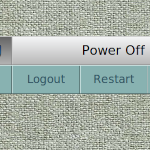
Restart Shutdown (modules) is made of FvwmButtons contaner. Has four functions: Logout, Restart, Power-off and Cancel.
## FILE 1: restartSDown.txt
## Modules

SetEnv logo-image $[HOME]/.fvwm/images

Module FvwmButtons RestartShutdown

DestroyModuleConfig RestartShutdown: *
*RestartShutdown: Geometry 450x96-735-492
#*RestartShutdown: PressColorset 5
*RestartShutdown: Fore #2b4e5e
*RestartShutdown: Back #88b2b1
*RestartShutdown: Frame 1
*RestartShutdown: Rows 2
*RestartShutdown: Font "xft:Sans:size=14:antialias=True"
*RestartShutdown: Padding 2 2

*RestartShutdown: (Icon "$[logo-image]/fvwm-logo-small.png", Colorset 20)
*RestartShutdown: (3x1, Title "Power Off", Colorset 202, Font "xft:Sans:size=16:antialias=True")

*RestartShutdown: (4x1,Container(Rows 1,Frame 1))
*RestartShutdown: (Title Cancel, Action(Mouse 1) KillModule FvwmButtons RestartShutdown)
*RestartShutdown: (Title Logout, Action(Mouse 1) Quit)
#*RestartShutdown: (Title Restart, Action(Mouse 1) Exec systemctl reboot) #1Systemd Linux distro
#*RestartShutdown: (Title OK, Action(Mouse 1) Exec systemctl poweroff) #2Systemd Linux distro
*RestartShutdown: (Title Restart, Action(Mouse 1) Exec sudo /sbin/reboot) #3Non-systemd
*RestartShutdown: (Title OK, Action(Mouse 1) Exec sudo /sbin/poweroff) #4Non-systemd

# Style Setting
Style RestartShutdown !Borders, !Title, WindowListSkip, StaysOnTop, Sticky
HOW TO:
Copy the code and paste it into your config. Or create FILE 1 and run the below line:
Read $[HOME]/.fvwm/restartSDown.sys