Window List
Jump to navigation
Jump to search
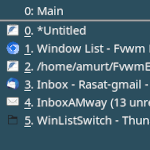
Window List (modules) Generates a pop-up menu (and pops it up) in which the title and description of each of the windows currently on the desktop are shown.
## FILE 1: winLSwitch.sys
## Modules

## Reset WinListSwitch
KillModule FvwmButtons WinListSwitch

Module FvwmButtons WinListSwitch

DestroyModuleConfig WinListSwitch: *
*WinListSwitch: Fore #ffffff
*WinListSwitch: Geometry 92x30-0+120
*WinListSwitch: PressColorset 4
*WinListSwitch: Frame 0
*WinListSwitch: Rows 1
*WinListSwitch: BoxSize smart
*WinListSwitch: Font "xft:Sans:size=10:antialias=True"
*WinListSwitch: Padding 2 2

*WinListSwitch: (1x1, Title CurW, Back #2b4e5e, Fore #ffffff, Action(Mouse 1) WindowList (CurrentPage) Root c c )
*WinListSwitch: (1x1, Title AllW, Back #faa46e, Fore #000000, Action(Mouse 1) WindowList Root c c)

# Style Setting
Style WinListSwitch !Borders, !Title, StaysOnTop, WindowListSkip, Sticky
HOW TO:
Copy the code and paste it into your config. Or create FILE 1 and run the below line:
Read $[HOME]/.fvwm/winLSwitch.sys