Control Pager: Difference between revisions
Jump to navigation
Jump to search
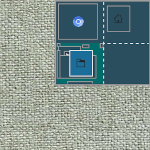
(Created page with "right|150px|link=Control Pager|Image '''Control Pager''' <small>''(module)''</small> is made of FvwmButtons. Miniature view of desktops (2x4). <pre> ## FILE 1: controlPg.txt ## Pager # Virtual Desktop DesktopSize "2x2" Module FvwmButtons ControlPagerB DestroyModuleConfig ControlPagerB: * *ControlPagerB: Fore #ffffff *ControlPagerB: Back #2b4e5e *ControlPagerB: Geometry 130x115-0+0 *ControlPagerB: Frame 0 *ControlPagerB: Rows 1 *ControlPag...") |
No edit summary |
||
| Line 1: | Line 1: | ||
[[File:control-pg.png|right|150px|link=Control Pager|Image]] '''[[Control Pager]]''' <small>''( | [[File:control-pg.png|right|150px|link=Control Pager|Image]] '''[[Control Pager]]''' <small>''(modules)''</small> is made of FvwmButtons. Miniature view of desktops (2x4). | ||
<pre> | <pre> | ||
| Line 31: | Line 31: | ||
__NOTOC____NOEDITSECTION__ | __NOTOC____NOEDITSECTION__ | ||
[[Category: | [[Category:modules]] | ||
[[Category:pager]] | [[Category:pager]] | ||
[[Category:codes]] | [[Category:codes]] | ||

Revision as of 18:10, 11 July 2025
Control Pager (modules) is made of FvwmButtons. Miniature view of desktops (2x4).
## FILE 1: controlPg.txt

## Pager

# Virtual Desktop
DesktopSize "2x2"

Module FvwmButtons ControlPagerB

DestroyModuleConfig ControlPagerB: *
*ControlPagerB: Fore #ffffff
*ControlPagerB: Back #2b4e5e
*ControlPagerB: Geometry 130x115-0+0
*ControlPagerB: Frame 0
*ControlPagerB: Rows 1
*ControlPagerB: BoxSize smart
*ControlPagerB: Font -*-helvetica-medium-r-*-*-12-*
*ControlPagerB: Padding 2 2

*ControlPagerB: (4x1, Swallow "FvwmPager" `FvwmPager *`, Frame 0)

# Style Setting
Style ControlPagerB Borders, BorderWidth 3, BorderColorset 10, NoTitle, WindowListSkip, Sticky, !Handles, StaysOnTop, !Iconifiable, FixedSize
Copy the code and paste it into your config. Or create FILE 1 and run the below line:
Read $[HOME]/controlPg.sys